Smart TVs

:D

Amazon Instant Prime 4K service has just launched...at no extra cost to their current service, so the blurb says!

Don't get an AX630B if you want 4K streaming. Has no inbuilt HEVC decoder so can't display 4k content from streaming via apps or via the USB connection.
 
Wish I had done a bit more research ahead of my purchase as it would appear it can't get ITV player... No biggie though, as when I've used the service on my laptop the ads are proper annoying...

Also, not yet convinced about the 'look' of HD... Looks great in the showroom not so sure about it in my living room...
 
Wish I had done a bit more research ahead of my purchase as it would appear it can't get ITV player... No biggie though, as when I've used the service on my laptop the ads are proper annoying...

Also, not yet convinced about the 'look' of HD... Looks great in the showroom not so sure about it in my living room...

Not sure if ITV player is available on many smart TVs due to license issues.
 
The good news is you'll be able to buy a smart Bluray player that does have it and get it that way ;).

i wouldn't mind, but I don't know what the heck your talking about tbh, some of it is above me, just found out other day that while on you tube on iPad impressed a TV looking icon and next thing I know it's on my TV! 😳
 
Wish I had done a bit more research ahead of my purchase as it would appear it can't get ITV player... No biggie though, as when I've used the service on my laptop the ads are proper annoying...

Also, not yet convinced about the 'look' of HD... Looks great in the showroom not so sure about it in my living room...

The look of HD or the look of UHD.

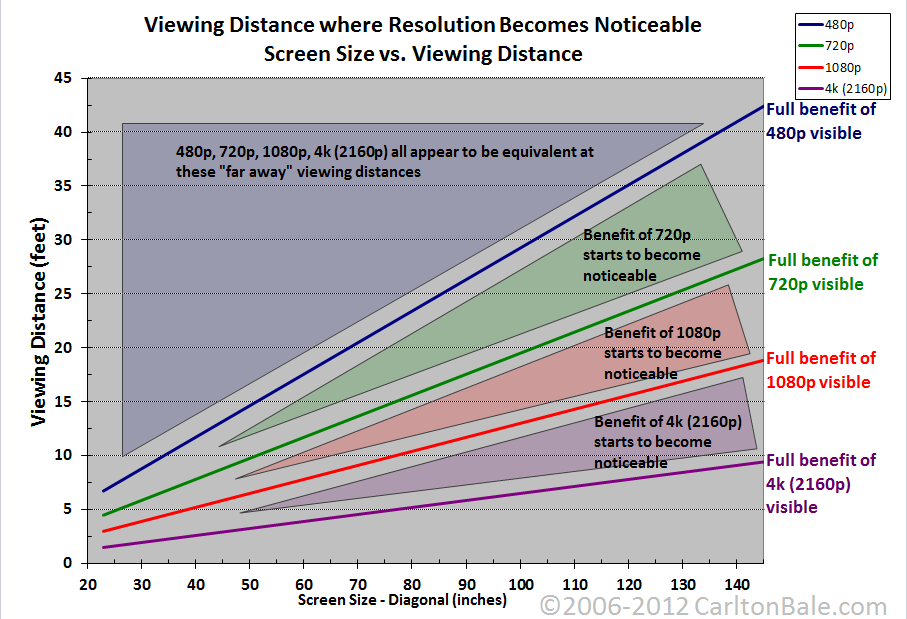
Screen size plays a big factor. You need to go to in excess of 32" for 1080 HD to start making a real noticeable difference at normal viewing distances. Further away the less the perceivable difference.

resolution_chart.png


Another thing is the fact that show rooms, so often, don't link up to a HD demo. Lots still use an old Coax system which are upscaled by the TV. Only the TV's being pushed and promoted getting connected to proper sources to make them stand out above the rest. Then add in the fact that demos on a shop floor are often set to the TV demo mode. This pushes up the backlight, contrast, colour etc to get the image to "pop" out at you. Unfortunately these settings are pretty close to useless in the home as they are to bright and push an picture that is unnatural looking.

If you are buying a TV and want to see it properly ask the store to hook up to an appropriate source if it isn't already and alter the settings to reduce some of the "buy me buy me" settings of the store demo and give you a more true idea of what you'll be getting.

HD streams like netflix etc use compression. It is technically HD in terms of resolution but the compression can create poor gradients especially with blacks. Usually noticeable as bands within areas of black detail.

TV broadcast also does this and it uses 1080i which is interlaced and means each frame is actually only half the picture data. This is why is sometimes appears a little more blurry with high speed motion.

Only Bluray truly shows HD to it's best and even then it only when you set up the TV at least half properly. A setup disc like the Currys/PC World, Know How Picture Perfect Bluray is very good and easy to use. A little pricey at £30 but then you have just spent how many hundreds on a TV so surely a few more t help set it up a little is worth it. Can also get plenty of cheap copies around the bay and even in charity shops.
 
Last edited:
The look of HD or the look of UHD.


I work with 'old fashioned' film so can be a bit sceptical of anything relating to HD UHD 2K 4K call it what you will... Animation, some documentaries can look good in HD but drama's etc can look a bit 'surgical/false'...

Getting more used to the 'look' but when I visit my son and see my old plasma Panasonic I do yearn, a little, for having it back...

I love cinema and film for all its 'imperfections'...
 
Wish I had done a bit more research ahead of my purchase as it would appear it can't get ITV player... No biggie though, as when I've used the service on my laptop the ads are proper annoying...

Also, not yet convinced about the 'look' of HD... Looks great in the showroom not so sure about it in my living room...

cant be set up correctly as HD is stunning compared to SD, I cant watch SD content anymore
 
Reduce the amount of motion smoothing which is great for fast action stuff but causes what is known as soap opera effect for other content. A cinema mode on the TV would probably do most of the work and you can tweak it.

Could also be a frame rate issue. If the TV allows to force it then turn on 24fps film mode if you can.

Motion processing wasn't really on earlier plasmas as it was to fix blur which was more of an LCD issue. It is on newer plasmas though. This may be a reason for your fondness of the old plasma.
 
Last edited:
Top