• We'd like to take this opportunity to wish you a Happy Holidays and a very Merry Christmas from all at Golf Monthly. Thank you for sharing your 2025 with us!

fake email

I got one last week demanding payment in Bitcoin or they would release a video of me on a Zoom call. Outside of the fact that I have never used Zoom, it was pretty accurate ;):LOL:
 
...and there are the ones from the bank that you've never had an account with telling you there's a problem or whatever with your account.
 
I work for a company that provides cyber security products. Part of my job is dealing with spam, we process millions on a daily basis...... Very rarely get spam in my work or personal email accounts, only seem to get spam in my personal Outlook account, but that's already in the junk folder. Most fake email is pretty obvious to spot, although there are some more sophisticated efforts which maybe not be so obvious to the likes of some, such as my old mum. On a basic level, no bank or company such as Amazon or Paypal are going to send you requests to revalidate or update your account or password details out of the blue - just bin them if they are not already in your junk folder (they're in there for a reason). Genuine requests are usually because you have tried to login to a particular site and failed because you've forgotten your password or typed it wrong too many times, then the request is initiated by you and expected.
 
We had everyone in our company do a detailed training course on cyber security and spam e-mails. Really in-depth and very good.

The IT department decided the following week to create a spam e-mail with a link to all employees. 42% of them clicked the link. it took them to an external site reminding them of their obligations towards security.
And copied their two line managers …

Even I saw through that one but a few of my team didn't.
 
are you telling me that i haven't inherited £100M from my long lost uncle in Africa who was killed in a tragic car accident and the release fee I need to send them is a scam?

Mrs D is going to be gutted as i said i'd treat her to a slap up fish n chip meal to celebrate
 
I get a few but they automatically go straight to my junk folder, BUT WHY LET THEM THROUGH WHEN THEY KNOW THEY REALLY ARE JUNK :mad::confused:

Because the computer doesn't actually know they are all really junk, some genuine messages are occasionally blocked as spam, in that case the computer can't determine that it is actually a genuine message . Therefore many systems hold all junk for a short period of time so that you can check in case there is a genuine message in there before they are deleted automatically.
 
Disconcertingly had ones about my funeral plan (that I don't have) and several for bitcoins. Tried changing the password but some still getting through. Flagging them as spam

Not really sure why it would be disconcerting, you know you haven't got a funeral plan, so it's just a junk mail that means nothing. As for changing the password, you don't say which password, but I don't see how that will do anything. Spam is all tied to your email address, anyone can send an email to you if they know your email address (unless your system is configured to block the specific sender). It seems like your company/ provider has deemed it okay to deliver the spam to your inbox, but they tag it as spam. This is very common for large companies, it means that they won't inadvertently delete a genuine message that has been mistakenly held as spam. You work for the NHS, a lot of spam revolves around specific types of drugs, however, there are probably teams in the NHS that need to send genuine email around the system talking about same said drugs, therefore they can't block that kind of spam for fear of blocking genuine mail that may be time critical. Tagging the mail and delivering makes deleting the message(s) the responsibility of the user.

A lot of spam (unsolicited email i.e. stuff you didn't ask for) is triggered when people buy stuff online and don't check the boxes to opt out of partner communication. You have to look at the opt out boxes carefully, some you tick to opt out, but some you untick to opt out. If you don't opt out, your email address is likely passed around to any and all of that companies associate companies. The associates will in turn add you to their mailing lists, and potentially pass your email on elsewhere. Once your address is out there, mailing lists are sold on, eventually ending up with scammers.

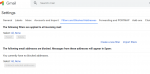
Your addresses can be obtained by other means, if your company has a directory server online that is accessible by the outside world, it's an easy lookup to find the employee addresses. Some company websites actually list their employees and their email addresses :rolleyes:. Scammers run address attacks, they will connect to your mail server and try to send hundreds of messages to known.names at yourdomain.com e.g. john.smith@ jsmith@ johnsmith@ alan.smith@, asmith@, alansmith@ etc. they will add any addresses accepted to their lists. Also, if at any point you ever respond to a spam email, they know they have sent to a live account and will add the address to their list. Depending on your mail system, you should also be able to create a rule in your mailbox that automatically moves all messages with a particular word in the subject, to another folder, such as deleted.
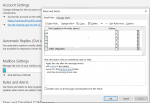
1606988380158.png

Some junk mail is considered genuine, e.g. newsletters, perhaps from Golf Monthly or some other company that you purchased from. Newsletters do have spammy characteristics, hence they also get dropped in to junk mail. In these cases, if you want the newsletter you can add the sender to a safe sender list so they are delivered to your inbox. If you don't want it, you can add the sender to a block list, you can just unsubscribe in the link provided, or you just delete it (the system will usually auto delete the junk folder after a set time e.g. 7 days).

Many mail systems are different, it will depend on what your company deploy, they may well have systems in place that deal with spam. Private home accounts are different, the mainline systems like Outlook (Hotmail), Gmail, Yahoo etc. usually have options for safe senders and block lists, my outlook account is actually pretty good at keeping spam out of the inbox, but if you have your own domain hosted somewhere, your host may not always provide the best anti-spam options by default.

Hopefully that's of some use
 
Last edited:
Does any one know how delete/block a spammer so that it doesn't even go the spam file or even to the bin in 1) gmail 2) outlook ?
 
Disconcertingly had ones about my funeral plan (that I don't have) and several for bitcoins. Tried changing the password but some still getting through. Flagging them as spam
Changing your email password has absolutely zero effect on whether you receive spam emails! And if they really are such spam, simply delete them!
I use Gmail and that's great at auto-directing spam to a spam folder. Hotmail seemed to be pretty good too when I used that. Perhaps consider using a different email provider, though that could involve hassle notifying contacts about the change! FWIW there's one about funeral plans in my spam folder dated 17/11. No doubt plenty hawking bitcoin dealing schemes too.

As n-m-w replied, they are not auto-deleted just in case it's a 'broadcast' mail from a reliable source that triggers the 'send to spam' function. Amusingly (well, slightly), one of the few real ones that got spam-ised (a long time ago) was from my bank about how to protect my online-banking environment!
 
Does any one know how delete/block a spammer so that it doesn't even go the spam file or even to the bin in 1) gmail 2) outlook ?

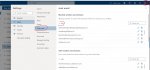
For Outlook, click on the settings icon on the top right of your mailbox (cog wheel), select "View all Outlook settings" at the bottom of the pop up, select Junk Email from the next popup. You can add block or safe senders or domains

outlookjunk.JPG

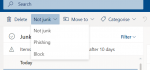
You can just click on a mail in your junk folder or inbox and select one of the options at the top

1606987979088.png

I don't generally use Gmail, but it has some similar settings

1606988107552.png

hope that helps
 
Top