Mini PCs

i3 4160@3.6 Ghz
8 gb ram
120gb ssd
1 TB hard drive
windows 10 pro

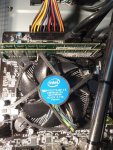
Ok, so that's a 4th Gen Haswell CPU on a socket LGA1150 (in case you look for coolers, you need it to be compatible with the socket).

I can imagine it's the original cooler, which is terrible anyway. If the system runs ok for you, i.e. is fast enough and does what you need it to, then a replacement cooler would probably work.

It all depends on the case, that was the one thing I overlooked. The depth of the case will determine how big the cooler is. Obviously the larger it is, the more air it moves and the slower it spins, more quiet.

Other thing that can't hurt is replace the thermal paste if it's never been done. That's the compound that sits between the cooler and the CPU "lid" and helps transfer the heat to the heatsink.
 
Theres a cross brace just next to the fan with probably a 2cm gap

View attachment 35767


So something like this https://www.amazon.co.uk/Noctua-NH-...1&keywords=noctua+nh-d9&qid=1616447525&sr=8-4

Would be of similar design but possibly slightly deeper. But it WILL have a better heatsink and fan combination. I use these NH-d9 coolers on all my mini builds as they are superb. Ugly as sin mind, but they do a cracking job. The fan design probably provides more than double the static pressure of the Intel stock crap so the Noctua doesn't have to work as hard, ergo quieter.
 
I thought my computer was slow........
I was chatting to next door and he complained about his office computer.
It's a Celeron E3400 with 2 GB of ram.

So now I'm looking for 2 new computers :(
 
I thought my computer was slow........
I was chatting to next door and he complained about his office computer.
It's a Celeron E3400 with 2 GB of ram.

So now I'm looking for 2 new computers :(

That's a terrible system, even in 2010 it was awful. The E3400 was an absolute dog. Slow, high memory latency (making already slow memory even slower).

Sounds like you have your work cut out.

If only you knew somewhere that built systems :ROFLMAO:
 
I thought my computer was slow........
I was chatting to next door and he complained about his office computer.
It's a Celeron E3400 with 2 GB of ram.

So now I'm looking for 2 new computers :(

In all honesty, your desktop could probably get a couple of upgrades and serve your limited use case quite well.

New cooler (replace thermal paste), 16Gb ram, replace both drives with a single larger, faster SSD (unless you really need 1TB of space).
 
In all honesty, your desktop could probably get a couple of upgrades and serve your limited use case quite well.

New cooler (replace thermal paste), 16Gb ram, replace both drives with a single larger, faster SSD (unless you really need 1TB of space).

I'm not sure if it is upgradable RAM wise.
I'm a bit like a golfer who has seen shinys in the future :)
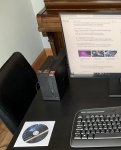
 
I've just got a returns label for my noisy mini pc so will send that back this afternoon.
When I get the refund next week I will look again. Thanks for your help
 
Rather than start a new thread thought Id ask on here:

My mini pc has started to make a very loud whirring noise when it is booted up. Some times lasts a few minutes then stops, other times I have to turn off leave it a little while and then restart it. In both cases once it stops it rarely restarts again until the pc sleeps and is rebooted. I assume its a fan/cooling issue as the box feels pretty hot compared to how it normally is.

Any ideas whats causing and if theres a potential repair?


Secondary questions as Ive already started looking at potential replacements:

Ryzen or I5 processor (probably Ryzen 5600G or Intel I5 11500)? Ive always had Intel not AMD processors but am sure it was @GreiginFife who said the Ryzens were possibly a better option now? (Usage is not for gaming, mainly for some large data analysis, some in Excel, some in SQL and slowly progressing to doing some coding in Python. Also sometimes do some live trading which can be chart heavy (but have always assumed thats graphics card hungry not anything else), Usually runs 2 monitors, or sometimes just 1 32" at 4k). Looking at the above processors, Asus motherboard, 16Gb of DDR4 3200 Corsair ram, Samsung 500Gb 980 M.2 NVME. Comments appreciated. MTIA
 
This might seem silly but is there a lot of dust around the vent? Try blowing or blasting with an air hose ideally to try and clear as much as you can. You aren't just clearing the outside but get the accumulated dust from inside as well. It's probably more than that but it's an easy starting point
 
This might seem silly but is there a lot of dust around the vent? Try blowing or blasting with an air hose ideally to try and clear as much as you can. You aren't just clearing the outside but get the accumulated dust from inside as well. It's probably more than that but it's an easy starting point

Its been cleaned (compressed air), LT, not the issue sadly
 
Top