How do I post photos that are too large?

Shanker69

New member
Joined
Jul 15, 2022
Messages
27
Visit site
If I want to add some photos, how do I do it?

I've tried but I'm being told the the jpg files are too big. I have three photos but all of them are under 5MB. Two are less than 4MB.
 
I suspect the limit is about 2MB. You'll need to compress them, or make them literally smaller.

Alternatively, upload them somewhere else such as thumbsnap, then click the image button and then the link icon and paste the URL in
 
interesting thread, everytime i try to post a pic it says too big
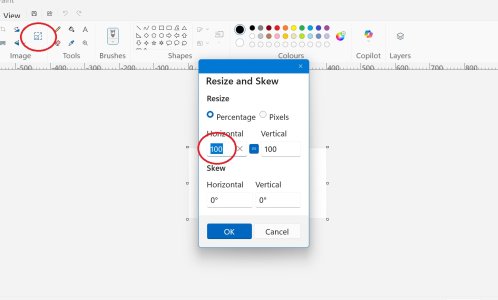
If you are on Windows, open the PAINT programme and on the left, click on RESIZE.
A box will appear with 100 highlighted
Reduce that to 50 or 30 or 10, whatever and then save.
That will save the pic in a smaller size.

kkkkkkkkkkkk.jpg
If you want to keep the original pic size, click on ''Save as'' and give it another name. Then you'll have 2 versions of the same pic
 
Last edited:
test interesting, I can resize straight from my photos now, I didnt used to be able too
 

Attachments

  • small pic (3).JPG
    small pic (3).JPG
    32.8 KB · Views: 12
Last edited:
On my PC, if I right click on the picture, one of the options is “Resize”.
Is that resizing the dimensions or the filesize though? I think when the forum blocks an image it means it's too large in filesize. I'm not sure it cares about the dimensions because you can make that smaller by dragging the corner in before posting anyway.
 
Is that resizing the dimensions or the filesize though? I think when the forum blocks an image it means it's too large in filesize. I'm not sure it cares about the dimensions because you can make that smaller by dragging the corner in before posting anyway.
It's resizing the file size.
 
Is that resizing the dimensions or the filesize though? I think when the forum blocks an image it means it's too large in filesize. I'm not sure it cares about the dimensions because you can make that smaller by dragging the corner in before posting anyway.
If you make an image smaller in physical size, it'll be smaller in filesize as well
 
Is that resizing the dimensions or the filesize though? I think when the forum blocks an image it means it's too large in filesize. I'm not sure it cares about the dimensions because you can make that smaller by dragging the corner in before posting anyway.
Resizing the dimensions will also reduce the file size, less pixels unless you play around with the DPI.
 
Top