
Computer Screen Connection Query

Lord Tyrion

Money List Winner
Moderator
Joined
Sep 9, 2014
Messages
33,877
Location
Northumberland
Visit site
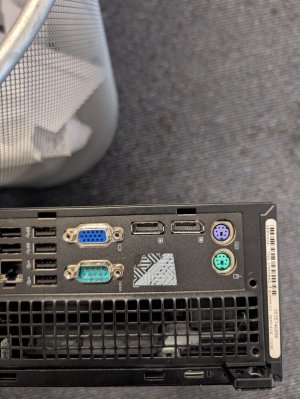
Anyone know what sort of connection I need to connect my screen to this desktop?

It is the connections to the left of the round purple connection.

I thought it would be a HDMI connection but a regular HDMI does not fit it.
HDMI connection.jpg
 
Google image search is your friend here.

Based on the shape and pin configuration, the port shown in the image is a Mini-DisplayPort (Mini DP).
  • Description: The Mini-DisplayPort is a compact, digital display interface developed by Apple.
You’re looking at about £6 to pick one up from Amazon to work with whatever you want to connect.
 
The ports in the image are for a DisplayPort cable.
  • DisplayPort: This is a digital display interface used primarily to connect a video source to a display device, such as a computer monitor.

  • Symbol: The symbol below the ports—a "D" with a vertical line inside—is the logo for DisplayPort.

  • Versions: DisplayPort cables come in different versions (e.g., 1.2, 1.4, 2.1) that support various resolutions and refresh rates. For example, DisplayPort 1.2 can support 144Hz at both 1080p and 1440p resolutions, while DisplayPort 2.1 supports up to 8K at 60Hz.

Good old google image search and AI description :)

EDIT: Lucifer is obviously on a quicker machine than my work laptop :ROFLMAO:
 
The ports in the image are for a DisplayPort cable.
  • DisplayPort: This is a digital display interface used primarily to connect a video source to a display device, such as a computer monitor.

  • Symbol: The symbol below the ports—a "D" with a vertical line inside—is the logo for DisplayPort.

  • Versions: DisplayPort cables come in different versions (e.g., 1.2, 1.4, 2.1) that support various resolutions and refresh rates. For example, DisplayPort 1.2 can support 144Hz at both 1080p and 1440p resolutions, while DisplayPort 2.1 supports up to 8K at 60Hz.

Good old google image search and AI description :)

EDIT: Lucifer is obviously on a quicker machine than my work laptop :ROFLMAO:
iPhone fastest thing on the planet other than a wife jumping to conclusions 😉🤣
 
Thanks all. I have ordered a Display Port to HDMI cable.

We have bought this desktop, refurbed from Amazon, to replace an old desktop that will not upgrade to Windows 11. We can not take the risk of being unprotected. Annoyingly, it came earlier this week and I set today aside, my quietest day, to set it up so that I was good to go on Monday. Ah well
 
I am using the other type of IT you may be familiar with - you will appreciate the challenges 🫢
Oh Christ! You’ll be there all day just waiting for an update that needs to reboot you 30 seconds after logging on 🤣

Can’t wait to fire up my laptop when I go back in Monday, might be useable by November 😉
 
Anyone know what sort of connection I need to connect my screen to this desktop?

It is the connections to the left of the round purple connection.

I thought it would be a HDMI connection but a regular HDMI does not fit it.

View attachment 59653


I know my monitors are old but I have never seen a monitor without a SVGA input (the darker blue socket) I presume you can get by with that in the mean time (assuming you have a VGA cable)
 
I know my monitors are old but I have never seen a monitor without a SVGA input (the darker blue socket) I presume you can get by with that in the mean time (assuming you have a VGA cable)
We don't have a VGA cable, they went into the recycling at the tip a long time ago. We have only needed hdmi for quite a few years.

I can keep using my current computer until this turns up, it isn't critical. It's more annoying that today was set aside for this, it's my quietest day of the work and perfect to set things up.
 
We don't have a VGA cable, they went into the recycling at the tip a long time ago. We have only needed hdmi for quite a few years.

I can keep using my current computer until this turns up, it isn't critical. It's more annoying that today was set aside for this, it's my quietest day of the work and perfect to set things up.
My desktop (Apple Mac running Windows 10) isn't "up to spec" to run Windows 11, but theres no way I'm getting a new desktop to run W11. The scurity software I have is more than enough to keep my machine safe and protected.
 
My desktop (Apple Mac running Windows 10) isn't "up to spec" to run Windows 11, but theres no way I'm getting a new desktop to run W11. The scurity software I have is more than enough to keep my machine safe and protected.
It was only £165 so it was not worth taking the risk for that amount of money. I have no idea what all of the updates are relating to the operating system, whether security software alone is sufficient. It might be, it might not. We are happy to pay that amount and be sure (as much as you can ever be)
 
My desktop (Apple Mac running Windows 10) isn't "up to spec" to run Windows 11, but theres no way I'm getting a new desktop to run W11. The scurity software I have is more than enough to keep my machine safe and protected.
What security software do you have that will detect OS vulnerabilities that aren’t being patched? Wouldn’t mind getting it myself.
 
If you fancy more peace of mind, if you have a 365 subscription or pay for OneDrive storage and backup to it you can get extended security updates for another 1-3 years depending on your subscription. Whilst not free the cheapest plan is around £20 a year I think, so a pretty good deal to buy some extra time to figure out a longer term solution.
 
Top